
Your sending dashboard says 98% delivered, and you feel fine about it. You should not.
Delivered only means a receiving server accepted the message. It says nothing about whether the email reached a primary inbox, and that gap is where most cold campaigns quietly die.
The only way to close it is to send a test email to a list of seed mailboxes, then look at where it actually landed. That is the job these tools do, and the five here do it very differently.
So I compared them on seed coverage, spam filter depth, blacklist monitoring, automation and published pricing. For each one you will get what sits inside the tool, what it reports, where it falls short, and what the plans cost.
Some of it was not flattering to the expensive options. Some of it was not flattering to the free ones either.
Let's get into it.
If you want the background first, here is how inbox placement rate is calculated and why it moves.
That table is the summary, and five questions produced it.
A placement test is only as reliable as the number of real mailboxes behind it. Ten seeds across two providers tells you very little about a campaign going to 5,000 contacts.
So I looked for published seed counts and named provider lists. Most vendors publish neither, and I have said so where that happens.
Landing in Gmail spam and landing in Proofpoint spam are different problems with different fixes. Corporate filters like Proofpoint, Barracuda and Microsoft Exchange Online Protection sit in front of most enterprise inboxes.
Only one tool in this list names them, which genuinely surprised me.
Placement failures often trace back to a blocklist entry or a broken DNS record rather than your copy. So I checked whether each tool validates SPF, DKIM and DMARC and scans blocklists alongside the test.
If you want the setup side of that, here is how to monitor inbox placement across providers on an ongoing basis.
A one-off test is a snapshot. Scheduled tests and stored history are what let you catch a slow decline before it costs you a quarter.
I used official pricing pages only, checked on 22 October 2026. Where a vendor hides pricing behind a demo, I say so rather than quoting a third-party estimate.
With the criteria set, here is how each tool performed against them.
The Salesforge Inbox Placement Test is the best inbox placement testing tool for most cold email teams, because it is permanently free to run and it reports real folder placement rather than a predicted score.
That second part matters more than it sounds. Several tools in this category score your email against spam heuristics and give you a number out of ten, which is a guess about what filters might do. This one sends a real message and tells you where it physically landed.
The free access is also the only unconditional free access in this comparison. Warmy expires after seven days, GlockApps stops after two credits, and Folderly caps you at two tests a month. This one has no expiry, no meter and no account requirement.
The test runs on a four-step flow. You are given a seed address, you send your campaign email to it from the mailbox you plan to use, you wait for processing, and you read the result.
The result screen splits your delivery into folder placement rather than a single pass or fail. You see what reached the primary inbox, what went to spam, and what was filtered into Promotions or Updates across Gmail, Outlook, Yahoo, and other providers.
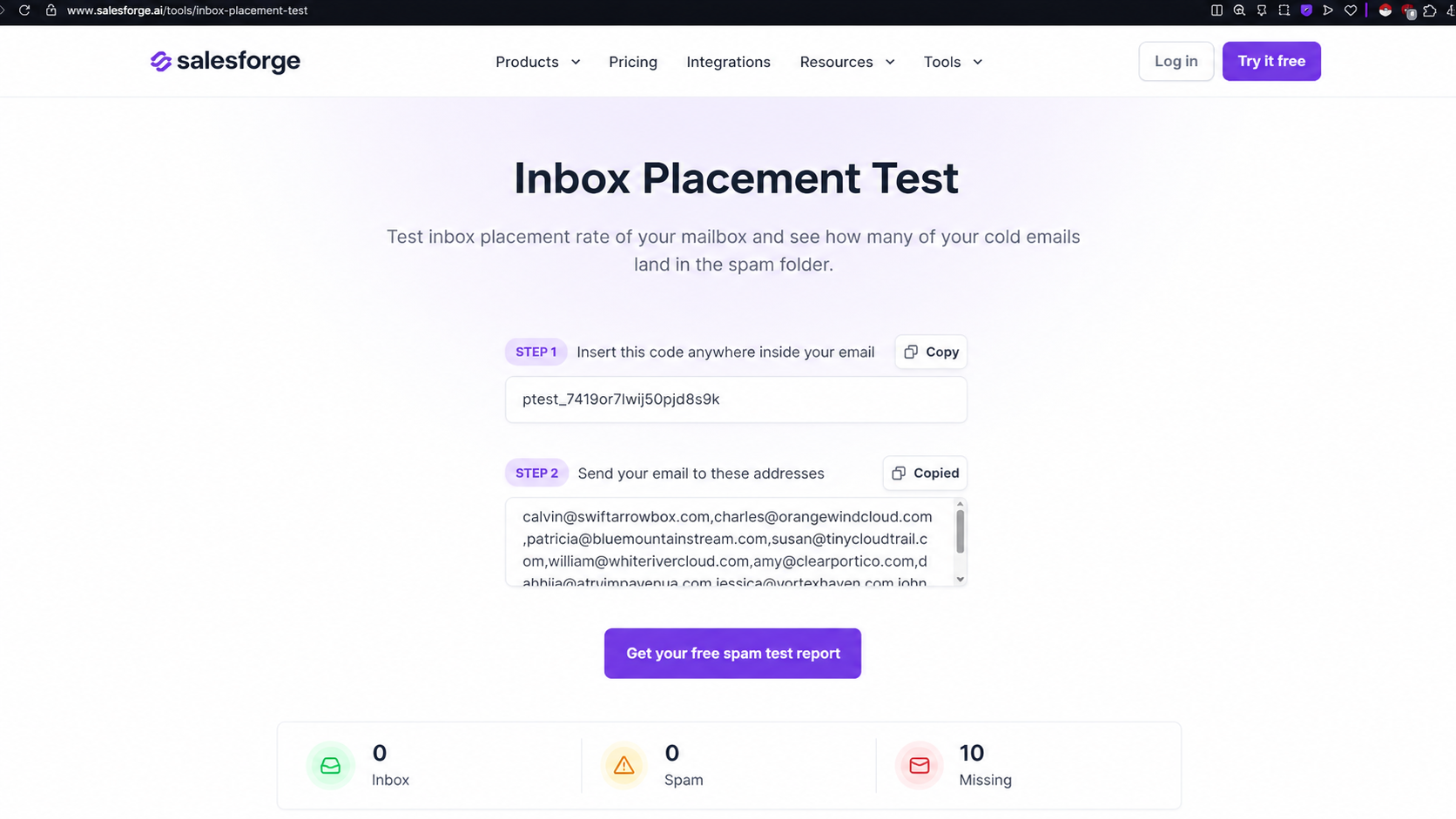
Authentication checks run inside that same result. SPF, DKIM, and DMARC are validated as part of the test, so a broken DNS record surfaces next to the placement data instead of in a separate tool. Warmy, by comparison, pushes authentication checks into a different product entirely.
The Placement Results Score sits on top of all of it. It is a 0 to 100% metric showing how much of your test volume reached the primary inbox, which gives you one number to track across sends.
Where it opens up is inside Warmforge. Connect a mailbox, and testing becomes unlimited; results are stored so you can watch trends, and the Growth plan runs each test against 250 mailboxes rather than a single seed. Blacklist status and domain reputation monitoring come with that tier too.
Bonus read: if you want the full workflow around this, here is how to test email placement before you send.
Start free with Warmforge and you get a warming slot and a placement test without a card.
Most tools in this category hide their seed list, and MailReach publishes theirs, which immediately made it easier to assess.
The free test runs against 28 seed addresses, broken down as 6 Gmail, 3 Hotmail, 3 Outlook and 16 custom domains. The paid test covers 30 or more mailboxes. Nobody else in this comparison gives you that breakdown before you pay.
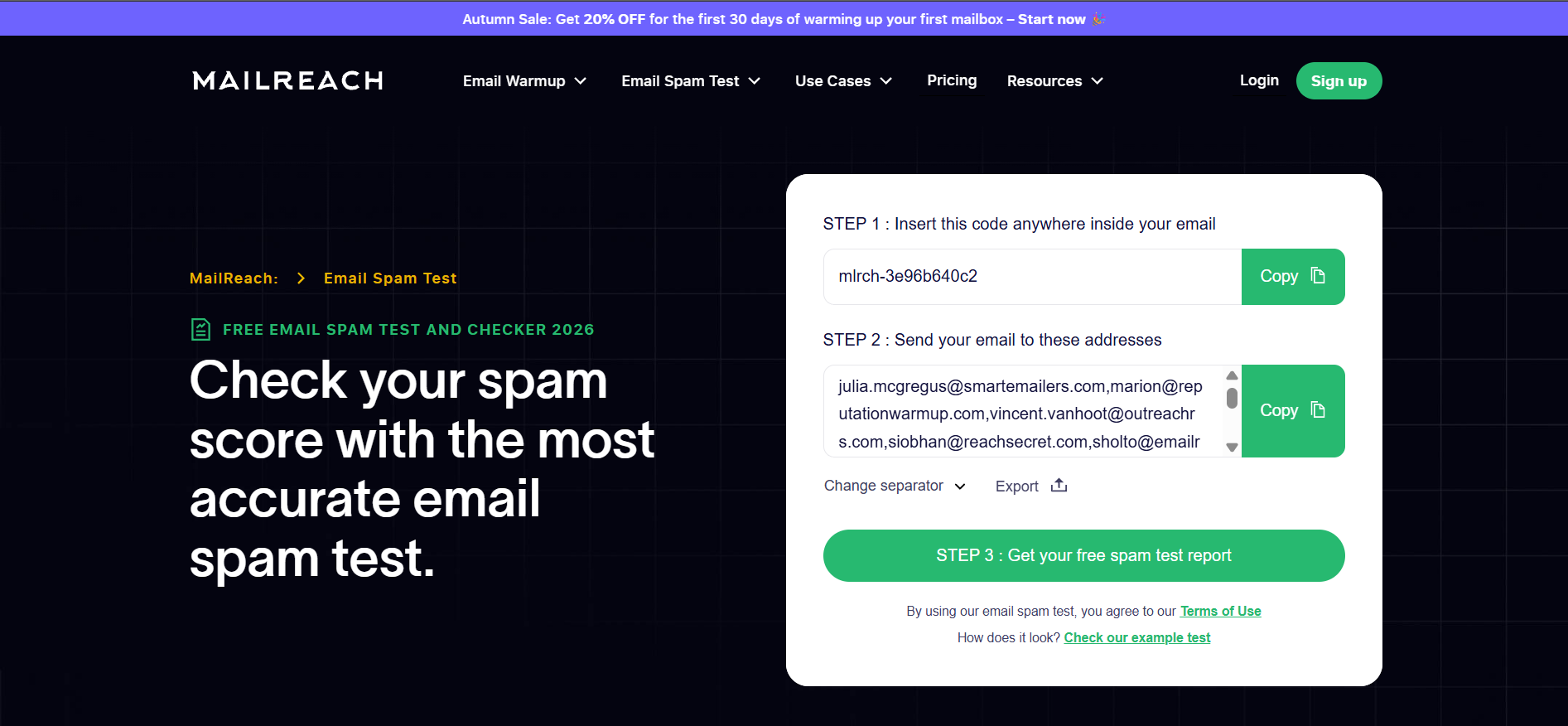
Warmup is the core engine here, and the spam test exists to support it rather than stand alone. That shapes what you get.
The test itself reports placement across those seed providers with tab classification, and it validates SPF, DKIM, and DMARC alongside the result. Tests can be scheduled to run automatically rather than on demand.
Where it goes further than most is content analysis. A links checker validates every URL in your email, an HTML checker flags structural problems, and a spam words checker catches trigger language before it costs you placement.
Results reach you through Slack notifications and webhooks, so a failing test surfaces in your team channel without anyone logging in. Email verification is bundled into the same per-mailbox subscription.
Warmup sits at the centre of this product, so it helps to understand the email warm-up process before judging the test results.
Here is the thing that complicates any recommendation on Warmy. They removed tier pricing from their public page around May 2026, and all that remains is a starting figure of $49 a month.
Everything past that runs through a demo booking. For a team trying to budget before a sales call, that is a real cost.
What you get in return is the largest warmup network in this comparison, at more than 35,000 real accounts across 36 providers.
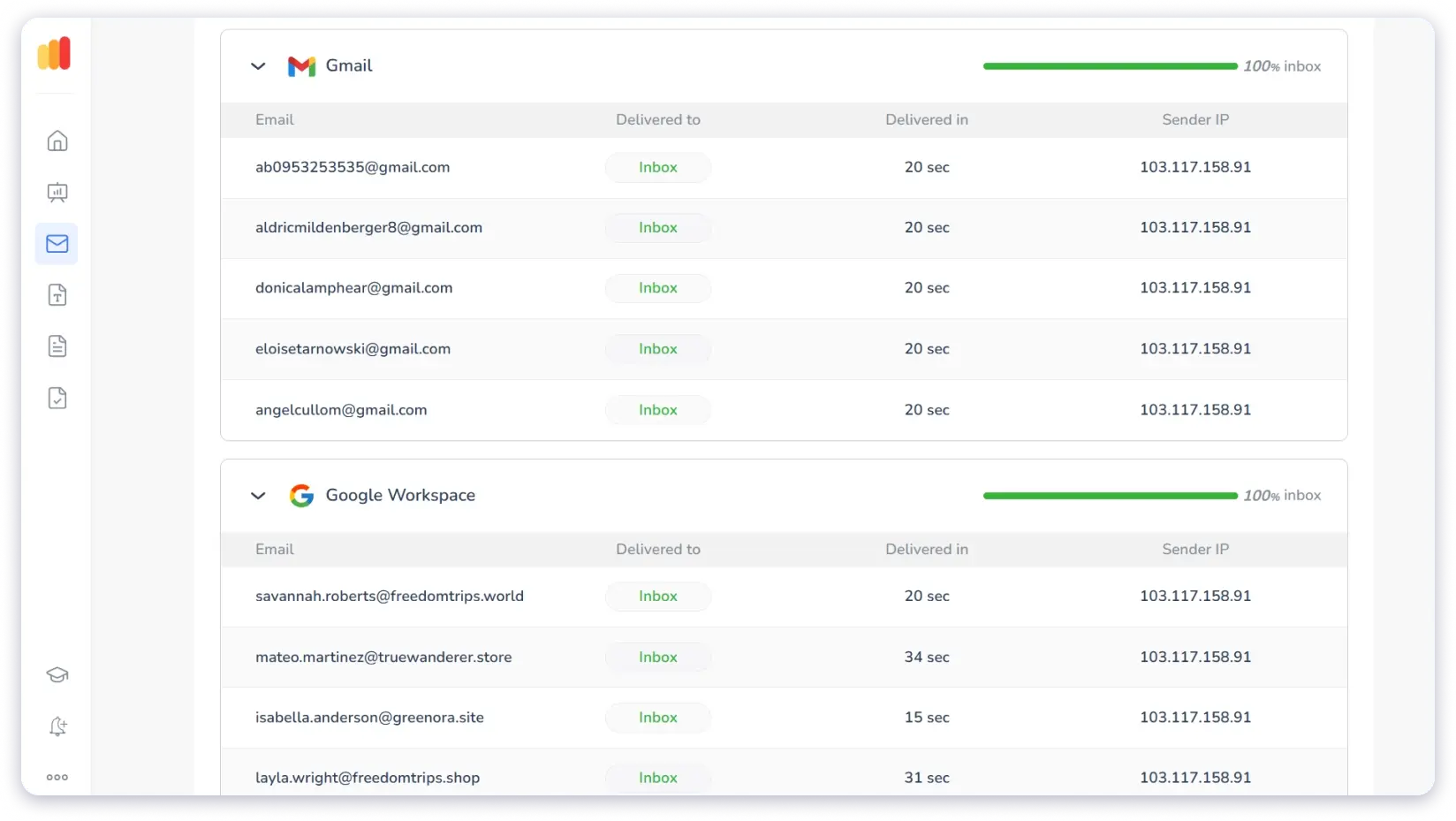
The placement test splits results four ways rather than the usual three. You see Inbox, Promotions, Spam, and Unreceived, and that last category is genuinely useful because it separates a hard delivery failure from a spam placement.
Underneath the summary, you get per-address detail. Each test mailbox shows its destination folder, delivery time, and the sending IP used, which makes it far easier to isolate which mailbox is dragging a domain down.
Adeline is the part most people notice. It is an AI agent that reads your placement results, diagnoses the likely cause, and tells you what to fix first. The tool also flags any result where fewer than 80% of test emails reached the inbox.
Auto-Test handles the scheduling side, with weekly tests configurable at workspace, domain, and mailbox level. Blacklist checks run against your sending IPs, with SpamCop confirmed by name, and API sending is supported.
One gap worth knowing before you buy. SPF, DKIM, and DMARC checks are not part of the placement test, and you run those through a separate header analyzer.
If diagnostic depth is all you care about, this is the one to beat, and nothing else here comes close on raw data.
GlockApps has run placement testing for more than 15 years, and it is the only tool in this list where testing is the core product rather than a bolt-on.
It names 27 ISPs it tests against, including Protonmail, Zoho, Mail.ru, Seznam.cz, Naver and a long list of European providers. You get a per-ISP breakdown rather than an aggregate, so you can see that Gmail is fine while Outlook is not.
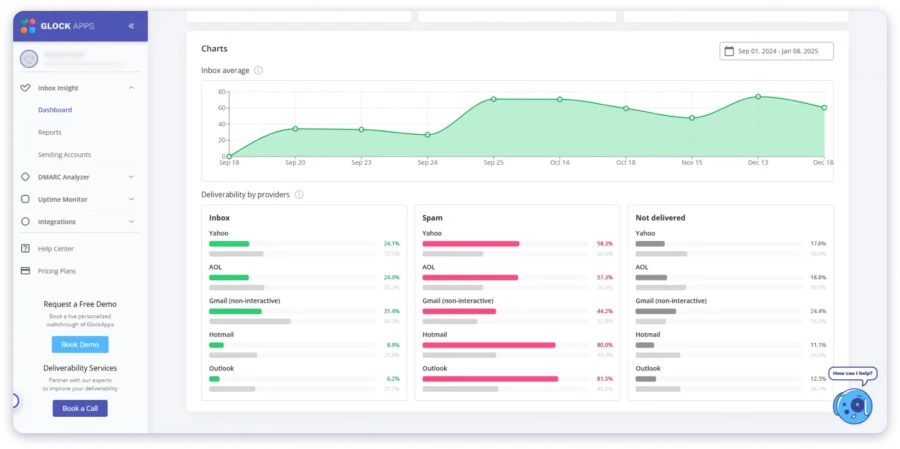
The spam filter reporting is the real differentiator. Five filters are named and reported individually, covering SpamAssassin, Microsoft Exchange Online Protection, Proofpoint, Barracuda and an exclusive Google filter built by GlockApps.
That matters more than it sounds. If you sell into finance, healthcare or legal, Proofpoint and Barracuda sit between you and the buyer, and no other tool here will tell you what they did with your email.
Blocklist coverage runs to more than 50 lists, the highest published count in this comparison. DMARC report processing is included, and Google Postmaster Tools connects directly for domain-level data.
API access comes on every plan, including the free tier, which is unusually generous. Sending integrations cover Mailgun, SendGrid, Amazon SES, Klaviyo, HubSpot and Google Workspace.
If the credit model does not fit your testing cadence, here are nine GlockApps alternatives worth comparing.
Raw placement data is one thing, and knowing what to change is another. That is the gap Folderly built Inbox Insights to close.
The AI recommendations are the centrepiece, and they are specific rather than generic. Reviewers single them out consistently, because the output tells you what to change in the email rather than listing possible causes.
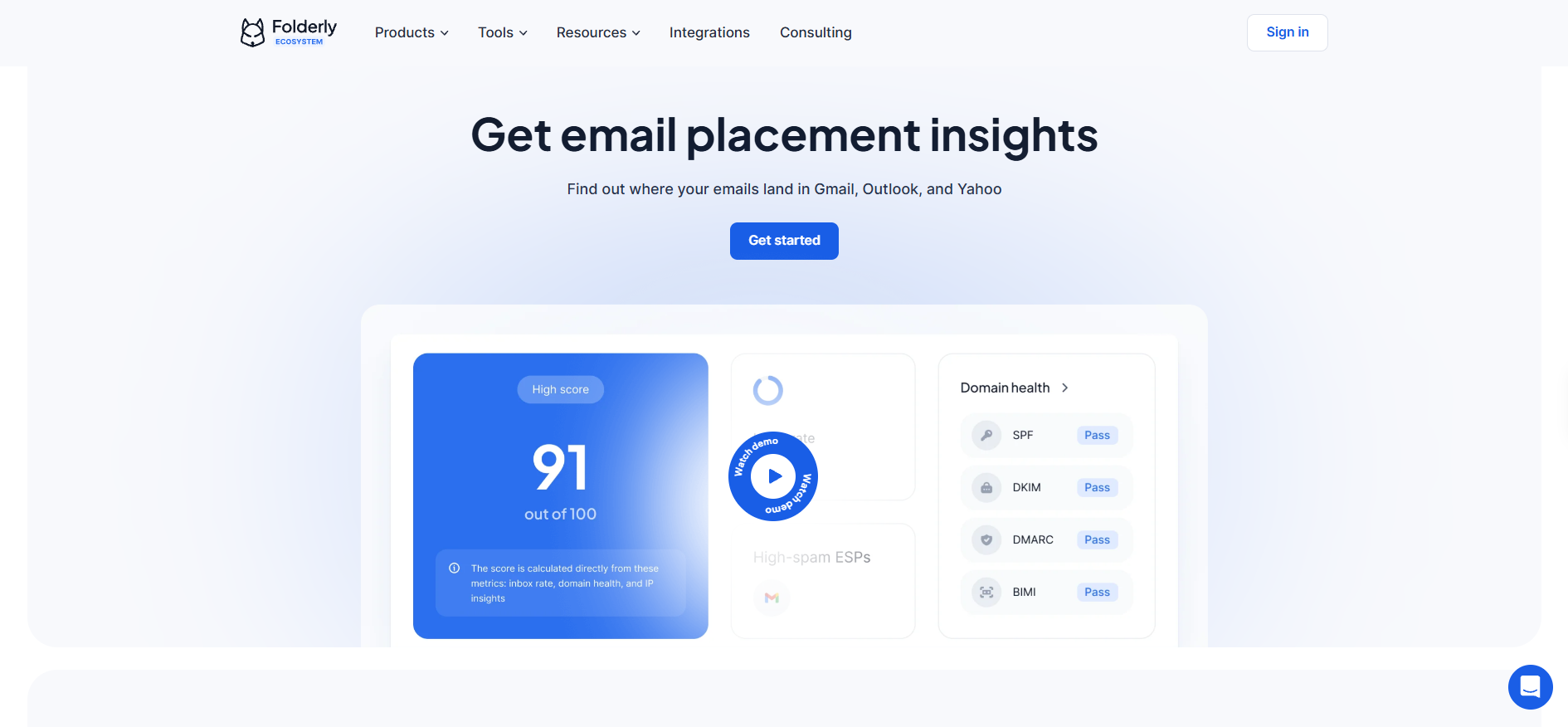
Content analysis backs that up. The spam words checker runs across nine languages, which no other tool in this comparison confirms, and template-level testing lets you check a sequence before it goes live.
Placement testing itself covers Gmail, Outlook and Yahoo, with tab classification and scheduled automated runs. Blacklist monitoring and SPF, DKIM and DMARC validation are included.
Pulse is the part worth knowing about even if you never pay. It is a free monitoring layer covering IP type, Sender Score, blacklist status and DMARC insights, and it is a standing offer rather than a trial.
One scope detail catches teams out. Test counts apply to the account, not to each mailbox, so a 100-test plan is 100 tests across everything you connect.
The Salesforge Inbox Placement Test is the best inbox placement testing tool for most teams, because it is free with no expiry and it reports real folder placement rather than a predicted score.
GlockApps wins outright on diagnostic depth, and it is the right call if you sell into enterprise inboxes.
Everything else here is a warm-up product with testing attached, which is fine if warm-up is what you actually need.
Start with a free placement test and a free warming slot inside Warmforge.
An inbox placement testing tool sends your email to a list of seed mailboxes and reports where it landed. Results typically split into primary inbox, Promotions, Updates and spam. It answers a question your sending dashboard cannot, because delivery rate only confirms the server accepted the message.
Yes. The Salesforge Inbox Placement Test is free with no account and no expiry. GlockApps gives two free credits, Folderly gives two tests a month, and Warmy offers a seven-day trial. MailReach offers a free spam test with limited credits.
Run one before every new campaign and after any infrastructure change. For ongoing sending, weekly scheduled tests catch a decline before it becomes a reputation problem.
If you want the full breakdown, here is an email placement test FAQ covering cadence and metrics.
Aim for 90% or higher on cold campaigns. Anything below 80% signals a reputation, authentication, or content problem that needs fixing before you scale volume. Warmy flags results below 80% automatically for this reason.
No. Testing tells you where emails land and why, and warm-up, authentication, and list hygiene are what move the number. Most teams need both a testing tool and a warm-up tool, which is why several products here bundle them.
GlockApps is the only tool in this comparison that reports results from Proofpoint, Barracuda, and Microsoft Exchange Online Protection by name. If your buyers work at companies using those filters, that coverage is hard to replace.
